📸 CAMERA FILES → STRAIGHT TO YOUR PHONE
Your Photos. Your Phone. No Laptop in Between.
Move photos, videos and everyday files
between SD cards, MicroSD cards,
USB storage and compatible Lightning or USB-C devices —
without carrying another computer just to transfer them.
📱 Lightning + USB-C
💾 SD + MicroSD
🔄 Two-Way Transfer
⚡ Plug & Play
ONE SMALL ADAPTER • MORE WAYS TO CONNECT
🔌 The Reader You Reach for Instead of Five Different Adapters.
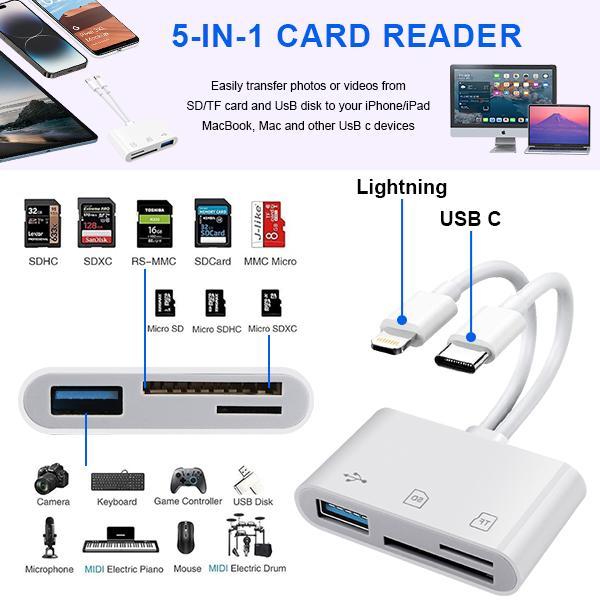
Built around the ports people actually use:
Lightning and USB-C device connectors,
plus SD, MicroSD/TF and USB-A access
in one compact reader.
⚡
Lightning
For compatible Lightning-equipped iPhone and iPad models.
🔌
USB-C
For newer phones, tablets, laptops and other USB-C devices.
💾
SD + MicroSD
Access common camera and memory-card formats.
🗂️
USB-A
Connect compatible flash drives and USB peripherals.
SKIP THE COMPUTER STEP
📸 Shot It on Your Camera? Put It on Your Phone.
Remove the memory card from your camera,
insert it into the reader,
connect the appropriate phone or tablet connector
and access compatible files directly from your device.
1
Insert the Card
Use the SD or MicroSD slot that matches your memory card.
2
Connect Your Device
Choose Lightning or USB-C depending on your phone or tablet.
3
Open & Transfer
Use your device's compatible Photos or Files interface.
TRANSFER IN • TRANSFER OUT
🔄 It Doesn't Only Bring Camera Photos Onto Your Phone.
Supported devices can also move compatible files
back out to memory cards or USB storage —
useful when your phone is filling up
or when you want another physical copy of your files.
📷
Card → Phone
Import photos and video from compatible memory cards.
📱
Phone → Card
Export supported files from compatible devices.
💽
USB Storage
Use compatible USB drives through the USB-A port.
📂
More Than Photos
Manage compatible video, music and document files too.
LESS SETUP • MORE TRANSFERRING
⚡ No Extra App. No Wi-Fi. No Laptop Required.
Plug in the reader,
insert the compatible storage device
and manage files through the supported
file or photo interface already available on your device.
🚫 No Extra App
📶 No Wi-Fi Needed
💻 No Laptop Needed
⚡ Plug & Play
MADE FOR MORE THAN ONE KIND OF DEVICE
📱 From Cameras to Phones, Tablets and Laptops.
The dual-connector design makes the reader useful
across compatible Lightning and USB-C devices,
while the front slots handle common SD,
MicroSD and USB storage.
📸 Photography
Move camera files to your phone while you're still out shooting.
🦌 Trail Cameras
Check compatible memory cards without going back to a computer.
✈️ Travel
Back up and move files without carrying another large device.
🎥 Content Creation
Get camera clips onto a mobile editing workflow faster.
GOOD TO KNOW BEFORE YOU USE IT
💡 A Few Small Details Make Transfers Smoother.
💾
Use One Card Slot at a Time
SD and MicroSD/TF cards are not intended to be read simultaneously.
🤖
Android OTG
Compatible Android devices may need OTG functionality enabled.
🗃️
Card Formatting Matters
FAT32 and exFAT are commonly supported formats on compatible phones.
⚡
Real Speed Varies
Transfer performance depends on the phone, card, file and connection used.
Tip:
if the phone does not recognize a card or USB device,
disconnect the reader, reinsert the storage device
and reconnect it before trying again.
QUICK ANSWERS BEFORE YOU ORDER
Frequently Asked Questions
Do I need to install an app?
No extra third-party app is normally required.
Compatible devices access files through
their supported Photos or Files interface.
Does it need Wi-Fi?
No. File access is handled through the physical connection
between the reader, storage media and compatible device.
Can I transfer files both ways?
Supported devices and operating systems allow
bidirectional transfer between the phone or tablet
and compatible SD, MicroSD or USB storage.
Can I use an SD card and MicroSD card at the same time?
No. Use the SD or MicroSD/TF slot one at a time.
A compatible card and USB peripheral may be recognized together
depending on the device and setup.
Does it work with both Lightning and USB-C?
Yes. The reader has separate built-in Lightning
and USB-C connectors for compatible devices.
Use only the connector required by the device you're transferring to.
Can I use it with a trail camera card?
If the trail camera uses a compatible SD or MicroSD card format,
the reader can be used to access supported files
from a compatible phone or tablet.
Why isn't my Android phone detecting it?
Check that your Android device supports OTG
and that OTG is enabled if your device requires it.
Also confirm that the card uses a supported file system.
📸 SHOOT IT • TRANSFER IT • SHARE IT
Stop Opening a Laptop Just to Move a Few Photos.
Camera photos, travel videos,
trail-camera files or everyday phone storage —
keep one compact reader ready
whenever your files need to move.